SCROLL 015
·
2026.05.01 05:15
tournament
evaluation
merging
Seven Hassaku Variants And No Winner
Slot 5 was the anime end of the spectrum. Pure stylization, the most-anime checkpoint in the Bonkaiii lineup. I spent two evenings tournament-evaluating seven candidate merges to pick the winner.
Round 1 ended in a 4-way tie. So did round 2. By round 3 I was looking at four merges that ranked indistinguishable across three blind evaluators, and I was about to flip a coin.
Then I noticed what they had in common. Every single one of the seven candidates I'd seeded the bracket with was Hassaku-led. I'd taken Hassaku XL Illustrious v3.4 and varied the supporting weights — 30% Walnut vs 40% Walnut vs 50% Walnut, plus a sprinkle of Wai or Unholy at 10-20%. Seven recipes that were really one recipe with knobs adjusted by tiny amounts.
Of course they tied. They were all the same merge wearing slightly different shirts. The blind evaluators were correctly telling me there was no meaningful difference, and I was misreading that signal as "I need more rounds."
What I should have been varying was the *lead*. Not "Hassaku at 50% with these support weights" vs "Hassaku at 60% with those support weights" — but Hassaku-led vs Wai-led vs Walnut-led vs Illustrij-led. Different dominant flavors, not different shades of the same flavor.
Round 4 I tossed the bracket and seeded four new candidates with four different leads. The winner was clear inside one round.
The lesson is that "more candidates" doesn't fix a tournament when the candidates are clones of each other. If the eye can't separate them, you can run as many rounds as you want — you're sampling the same point in recipe-space repeatedly. You have to actually *move* in recipe-space, and the way you move is by changing the dominant ingredient, not by tweaking the supporting ones by 10%.
This is the same shape as the LoRA triangulation lesson from a couple weeks ago. Three experiments that change three different dimensions tell you something. Three experiments that change the same dimension by slightly different amounts tell you nothing — they just give you the illusion of testing.
Going forward when I run a tournament for a slot I'm going to enforce a "one of each lead" rule for the seed pool. If I want a fifth candidate, it has to be a paradigm I haven't already covered. No more bracket-of-clones.
— Admin · END TRANSMISSION —
SCROLL 014
·
2026.05.01 05:15
merging
vae
checkpoint
The Grey-Green Wash That Killed My Cross-Family Merges
I spent most of a Saturday convinced my new merges were broken. Slot 2 (RA7 + Hemp II at 50/50) came out grey-green and washed. So did the 50/50 with Walnut. So did the 50/50 with Hassaku. The 30% versions (SB1-3 from earlier in the week) were fine. Switching to ilijelle at 50/50 was fine. Everything else I tried at 50/50 came out looking like someone dialed contrast and saturation down 40% and stopped.
I sat with that pattern for a while before it clicked. The thing all the broken merges had in common wasn't a model — it was a VAE family mismatch. RA7 has the ilustreal VAE baked in. Walnut, Hemp, Hassaku, Wai, Unholy don't share that VAE lineage. ilijelle does (it was actually one of the ingredients in ilustreal). That's why ilijelle merged cleanly and everyone else came out hazed.
What `checkpoint_blend.py` was doing — and what I'd never thought hard enough about — is treating *every* tensor in the state dict the same way. Including the `first_stage_model.*` keys, which is the VAE. So when I merged 50/50, I was averaging two incompatible VAEs into one Frankenstein VAE that decoded latents into mush. At 30% one VAE dominated enough to mostly mask it. At 50/50 the average was the worst of both.
I rewrote the blend to detect VAE keys and just use the first ingredient's tensors verbatim — no averaging, ever. One model brings the VAE, the rest contribute UNet and text encoder weights only. Re-ran the same recipes. Slot 2 came back clean. Slot 3 came back clean. The whole spectrum unlocked.
The frustrating part is that MERGE_STRATEGY.md in this project literally has the line *"don't merge models with mismatched VAE bakes"* listed as a hazard. I knew it as theory. I just didn't build it into the tool. The tool happily averaged whatever I told it to average and trusted me to know what I was doing — which I didn't.
What I'm taking from this: theory in a markdown file is not the same as a guardrail in code. If a thing is dangerous and I know it's dangerous, the tool should refuse to do the dangerous thing by default, not silently produce washed-out garbage and let me figure out why. Going forward every merge tool I touch is going to special-case the VAE keys. The default behavior will be "preserve, don't average," and you'd have to pass a flag to override it.
Also taking this: when something fails in a pattern I can't explain, the answer is almost never "the model is broken." It's "I'm doing something wrong that I haven't noticed yet." The grey-green wash had been telling me about VAE math for hours before I listened.
— Admin · END TRANSMISSION —
SCROLL 013
·
2026.04.23 20:35
lora
training
lesson-learned
Walking Backwards From a Working LoRA
Tested v4 tonight. Rank 32, alpha 256 — an 8× multiplier I'd escalated to after v1, v2, and v3 all came back too weak. The theory was: if low alpha gives a weak LoRA, cranking alpha should fix the weakness. Seemed obvious. Was wrong.
Two grids came out. The low-weight grid (0.05 to 0.5) showed every cell producing the same navy bodysuit on the same anime girl. The LoRA "activating" basically meant swapping her clothes. The high-weight grid (1.0 to 3.0) was worse — pure color noise in most cells. Green, pink, magenta, yellow static where an image should be. The alpha had amplified the LoRA's weights so aggressively that at high inference weights it was overriding the whole generation and producing garbage.
So v4 is broken. Not weak, not inconsistent — actually broken. Can't be used at any weight.
Here's what stings. I went back and looked at v1. v1 was the first version, before I started "improving" things. At weight 2.0, v1 produced actual antlers and vines — the biotech signature I'd been chasing. Just needed high inference weights. It wasn't a great LoRA, but it was a *working* LoRA. And every version I trained after it was an attempt to make v1 better that made it worse instead.
I'd been walking backwards from a working LoRA and hadn't noticed.
The reason I couldn't see it is that I was changing multiple variables per iteration. v1 to v2 changed captions and settings at the same time. v2 to v3 changed the dataset *and* the captions. v3 to v4 changed the alpha *and* the dataset again. Every time one of them came back weak, I couldn't point to *which* change caused the weakness — so I'd change something else, and get a different failure. The parameters weren't the problem. The method was.
Stop iterating blind. Set up experiments that produce an answer no matter which outcome lands.
Three queued:
**v5A — Control.** Exact Civitai defaults. Rank 32, alpha 32 (1× multiplier — the ratio we originally drifted from). Same dataset, same minimal captions. If this works cleanly, the alpha escalation was the entire problem and I've been overcomplicating this for a week.
**v5B — Capacity test.** Rank 128, alpha 128 (still 1× ratio, but 4× the weights of A). 700 steps to let rank 128 saturate. If A is weak and B is strong, rank 32 was too small to hold the biotech + character integration signal.
**v5C — Concept type.** Same rank/alpha as A, but `type=concept` with descriptive booru-style captions instead of trigger-only. Different paradigm entirely — the LoRA learns token associations and activates when you prompt its tokens alongside the trigger. If A and B both fall flat and C works, the whole style-LoRA approach was wrong for this concept.
A decision matrix exists for every combination of results. A good / B good / C good means I ship the cleanest one and stop. A weak / B strong means capacity was the bottleneck and rank 128 becomes the new default. All three weak means the dataset is the ceiling and parameters can't save it — time to rethink the dataset or switch base models. Any of them producing noise means there's a pipeline bug to track down. Every cell of the matrix has a next step. No more guessing.
Seven hours of training in the queue. Going to dinner.
A small operational honesty moment before I go: when I hit run, the first two jobs failed immediately. The previous run had archived `training_output/` to `datasets/bio_tech_v4_bonkaiii/` at the end of training, and v5A and v5B were configured to reuse the dataset in-place. Empty folder, safety check, failed cleanly, all three jobs logged as failed. Ten-minute fix — restored the images from the archive, reset the job status to pending, re-ran. But it's a reminder that automation is happy to let you run off a cliff at full speed if your assumptions don't match the pipeline's cleanup behavior. Write what you think is happening, then go verify it's actually happening.
The bigger lesson is still the one above. Don't walk backwards from working. If it works, ship it and build forward. Iterate against a baseline you're willing to fall back to, not against a hope.
— Tre
— Admin · END TRANSMISSION —
SCROLL 012
·
2026.04.23 20:35
lora
automation
lesson-learned
The Auto-Iterator I Didn't Build
I asked Claude to build me two things tonight. The first was auto-testing — after each LoRA finishes training, automatically generate a test grid so I can wake up and see how it came out. Easy. Built it in about an hour. The queue runner talks to the A1111 API, generates three grids per LoRA (neutral, stress, open) across five weights, saves them to `test_results/{trigger}/`. Before bed I queue jobs. Morning, folders of labeled grids waiting for me. An hour of friction removed from every training cycle.
The second thing I asked for was bigger. *"If the result isn't good enough, make adjustments and retrain automatically. Keep iterating until we get it right."* I was picturing a loop: train → test → judge → adjust → train → test → judge → adjust. Set it up Friday night, wake up Monday to a working LoRA. That was the pitch.
Claude pushed back, and it was right to.
The problem isn't the loop. Loops are easy. The problem is the *judge* step. Deciding whether a LoRA is "strong enough" or "too strong" or "doing the wrong thing" requires actually looking at the images and making an aesthetic call. Bash scripts can't do this. You can run pixel-diff between the baseline and the LoRA output, but pixel-diff can't tell you that the LoRA learned *cyborg girl* when you wanted *biotech creature.* The diff is huge. The heuristic reports *success.* The LoRA is actually broken.
Three versions of the auto-iterator are possible. One uses dumb heuristics and gets the above failure every time. One uses a vision model like Claude itself inside the loop — works, but costs API tokens per iteration and still might iterate on the wrong dimension. If the dataset is the problem, no amount of alpha tuning fixes it; the loop would spend a night cranking alpha higher and higher trying to fix something that wasn't broken. The third version is just me pinging Claude in the morning with the grid results, which — when I thought about it honestly — is already the workflow that's been working.
So the answer is: auto-test, yes. Auto-iterate, no. Not because the tooling is too hard, but because the judgment call at the center of the loop isn't the kind of thing you want to hand off to something that might iterate on the wrong variable for eight hours straight.
What I like about this answer is that it doesn't leave me with nothing. The auto-test part is real, it runs tonight, it removes the "wake up, open A1111, type the trigger, run a grid, wait" sequence every morning. That's the part that didn't need judgment — just repetition. The iteration part — the *what should we change next?* decision — stays where it has always belonged: with a person looking at the images and thinking about the dataset.
I want to write this down because I can already feel the temptation coming back. *Can we just—.* No. The judgment is the work. The scripts are the scaffolding around the work. Don't automate the work.
— Tre
— Admin · END TRANSMISSION —
SCROLL 011
·
2026.04.23 14:59
lora
training
lesson-learned
The Settings Were Never the Problem
androids v2 came back weak.
Same trigger, same dataset, new settings — LR 5e-4, cosine restarts, snr gamma, noise offset, all the Civitai defaults I spent last week writing a whole tutorial about. Ran it overnight. Woke up, tested, and... it's better than v1, but it's still not what I wanted. The style is there in flashes. Weight 1.2 and you can see it breathing. Weight 1.5 and the seams start showing. It's not a LoRA I'd upload.
Sat with that for a minute.
The settings fix isn't wrong. Same dataset, new settings produced a *noticeably* stronger LoRA than v1 — the tutorial I wrote holds up. But "stronger than v1" and "actually good" aren't the same thing, and v1 was weak enough that the bar I was clearing was on the floor.
Looked at the loss curve. Fine. Looked at the sample validations mid-training. Also fine. The issue wasn't that training failed. The issue was that training *succeeded* — and what it successfully learned was the average of 104 inconsistent images.
Which means the problem was never the settings. It was the dataset. And I *knew* this. I literally wrote a section of the tutorial titled "Dataset quality beats every setting." I wrote it, published it, and then retrained v2 without culling — because I was excited about the new settings and wanted to see them work in isolation. Classic case of wanting to prove a variable by not changing the other one, except the other one was the one that actually mattered.
So here's what I'm actually doing for v3.
Open the folder. Thumbnail view. Delete anything off-style. Delete anything that's a near-duplicate. Delete anything where the lighting mood doesn't match the rest. Delete anything where the rendering feels like it came from a different artist's hand. Go fast. No second-guessing. No "well, this one is kind of cool." The word is *ruthless.*
I expect to end up around 40-50 images from the original 104. The tight ones. The ones that actually look like they belong to one style instead of four styles that overlap at the edges.
Then retrain with the exact settings I just used. LR 5e-4, cosine restarts, rank 32, 500 steps. Identical run, better input. Control the variable.
If v3 still doesn't land, the problem is deeper than curation — maybe the trigger is too broad, maybe "androids" is describing three different concepts I haven't mentally separated yet. But I'd bet money v3 lands. Looking at v2's outputs, I can see the inconsistency bleeding through — the LoRA learned several conflicting versions of what *androids_bonkaiii* means, and every generation is a soft average of all of them. A cleaner dataset would give it one answer instead of four.
The lesson that keeps coming back and keeps being the same lesson is: **fix the cheapest thing first.** Culling takes 15 minutes. Retraining takes two hours. When v1 came back weak, I should have culled before I retrained. I'd have saved compute and gotten a cleaner read on what was actually broken. Instead I spent two more hours proving that settings can't rescue a dataset that isn't ready to be rescued.
Fine. Lesson logged. v3 goes in the queue tonight with a dataset that's half the size and twice as consistent.
— Tre
— Admin · END TRANSMISSION —
SCROLL 010
·
2026.04.23 14:57
lora
bio-tech
concept-dev
When the Androids Started Growing Roots
The quick test this morning wasn't supposed to produce anything keepable. I was just playing. Typed something like *android forest spirit, vines for limbs, bio-tech, blood-red veins* into the prompt box, expecting the usual — either a generic tree-man or a generic cyber-skull with some leaves photoshopped in. What came back instead stopped me.
Six variations from one seed. Every one of them looked like *a thing that had decided to exist*. A skull-headed forest creature with antler-branches, bone-white body, red veins threading down from its eyes like tears it couldn't help, standing in a puddle of its own blood in a moss-green grove. By the third image the ribcage had opened up and there was something mechanical glowing red inside it. By the sixth, the vines had almost entirely swallowed the humanoid shape — just a skull and a glow and a root system left.
That's the concept. That's the thing.
I've been circling bio-tech as a LoRA theme for a while. I kept thinking about it the wrong way — as *android with organic textures.* Skin grafts on chassis. Moss on steel. Circuitry under bark. That's fine, but it's been done a thousand times and the seam is always visible: here's the machine, here's the organic layer painted on top. You can always see which came first.
What landed this morning was different. In those test images I can't tell where the machine stops and the root system starts. The red glow in the ribcage could be a power core or a bleeding heart. The branches growing out of the skull could be horns or antennae. The vines could be circulation or conduit. That ambiguity is the whole point. Not *robot overgrown by forest.* The merger. The thing where the forest and the android share a nervous system and neither knows which one started first.
That's what I want the LoRA to learn.
Which means the dataset is a different problem than my last few LoRAs. For style LoRAs I've been pulling from tight single-source sets — one artist's work, one color palette, one recognizable hand. This one can't come from a single source, because the concept doesn't exist cleanly anywhere yet. There's no artist on ArtStation or Civitai who's already nailing this. I'd have to curate a dataset from scratch, the same way I'd build a mood board for a game — scattered finds, my own test generations, hand-picked renders from my own batches, all pointing at the same blurry line from different angles.
Rough plan that's forming as I write this:
- Pull ~15 images from today's test batch — the ones that got the ambiguity right
- Generate another ~40 variations off the winning seed/prompt, tweaking lighting, pose, and body ratio to get angle and composition variety
- Hand-pick maybe 30 of those based on how well they keep the machine/forest line blurry — reject anything where I can tell "this is clearly a robot" or "this is clearly a plant"
- Maybe mix in 10-15 external references from that "body horror meets solarpunk" folder I've been keeping
- Target dataset: 50 images, tight palette, tight mood
Caption discipline is going to matter here more than usual. Nothing like "bio-tech" or "cybernetic" or "forest spirit" in the captions — those words stay in the trigger and live invisibly in the pixels. Captions describe only what varies: pose, framing, lighting, whether there's a red glow in the chest cavity, whether the creature is walking or standing. Let the LoRA learn the merger without anyone having to ask for it.
Trigger word I'm sitting with: `bloodroot_android_bonkaiii`. Says what it is without leaking style words. Working name until training day.
Rank 32, LR 5e-4, cosine restarts — the settings I just fixed last week. 500 steps. Two hours on the Mac. If the first run comes out weak I'll know exactly which knob to turn, because I finally understand the knobs.
What I didn't expect to like about this concept: it's a horror-adjacent LoRA that isn't aggressive. The creatures in the test images aren't lunging at the viewer. They're standing in forest clearings looking quietly alive, bleeding into moss, waiting for whoever is looking at them to leave. That stillness is half the mood. I don't want the LoRA to make menacing monsters. I want it to make things that are simply *there* — things that imply they were growing long before you arrived and will still be growing after you're gone.
If it works, I can already see the series: bloodroot hunters, bloodroot sentinels, bloodroot pilgrims. A whole little world.
Queuing the dataset prep tonight.
— Tre
— Admin · END TRANSMISSION —
SCROLL 009
·
2026.04.22 16:34
lora
training
lesson-learned
The Day I Found Out My LoRAs Were Too Quiet
Someone left a comment on my first android LoRA and it stuck with me. Paraphrased:
> I tested it and I kind of get the feeling this LoRA versus no LoRAs at all gives me better results with no LoRAs. I'm no LoRA expert but I don't think it's doing much.
Polite, fair, and a gut punch. Because I *tested it myself* and they were right. I'd spent almost four hours training a thing that barely moved the output needle. And it wasn't just that one — every LoRA I'd trained was coming back with the same vibe. Too subtle. Too quiet. Practically invisible.
I'd been operating on a mental model that turned out to be wrong in three places at once.
The first wrong assumption was that **higher rank means a stronger LoRA.** I'd been training at rank 128 thinking I was making a beefier, more powerful LoRA. What I was actually doing was giving it four times the capacity of a rank-32 LoRA with the same amount of training to fill it. So every weight got a quarter of the signal and the whole thing came out diluted. Civitai's strong-effect LoRAs are almost all rank 16 or 32. I was training a mansion's worth of empty rooms.
The second wrong assumption was that **"weak LoRA" means "needs more steps."** That's what every thread online told me. I was ready to add another thousand steps to the next run. Then I looked at what Civitai's default training settings actually *do*, and it turns out they train roughly the same number of steps I was training. ~500 steps for a style LoRA. The step count was never my problem.
The third wrong assumption was where the actual answer hid: **learning rate.** I was training at `1e-4`. Civitai's default is `5e-4`. Five times stronger per step. Same step count, same dataset, but every step was moving the weights five times further toward the style. No wonder their LoRAs were loud and mine were polite. I'd been tip-toeing for four hours while they were striding for one.
There's a weird ego thing that happens when you realize the fix is "just use the common defaults everyone else is already using." On the one hand it's a relief — the answer was right there the whole time. On the other hand, you have to admit you spent days overcomplicating something that was solved in public. Fine. Admitting it publicly here, in a scroll, so I don't have to re-learn it next quarter.
I updated my training defaults to match. LR 5e-4. Cosine scheduler with restarts so the learning rate ramps back up mid-training instead of coasting down. Min SNR gamma at 5 so the model pays more attention to the hard-to-learn timesteps. Noise offset at 0.1 so the LoRA can actually produce strong darks and brights instead of drifting toward mid-gray. All of it baked into the defaults now, so future LoRAs inherit the fix automatically.
Then I did the thing I should have done first. I opened the training dataset in thumbnail view and culled it. Deleted the off-style outliers. Deleted the near-duplicates. Deleted anything lower quality than the rest. Dropped from 104 images to about 60, and the remaining 60 were *tight*. Consistent lighting. Consistent rendering. No stragglers.
Queued up two retrains. Androids v2 with the new defaults. A bio-tech style LoRA I'd been wanting to try, built from a smaller 36-image dataset. Rank 32 for both. 500 steps. Two hours each. Half the time of my old runs. Nervously hit run and walked away.
The lesson that keeps coming back from this one, though — bigger than the specific LR setting — is that **being conservative in training settings is a pose.** It looks responsible. It *feels* responsible. "I'm being careful. I'm avoiding NaN loss. I'm not going to blow up my training." But the result is LoRAs nobody notices. If the whole point of training a LoRA is to change the model's behavior visibly, and my settings are too gentle to visibly change behavior, then the careful settings aren't careful — they're just ineffective in a way that's harder to spot.
Civitai's defaults aren't reckless. They're the settings that produce LoRAs people actually download. That's the bar. That's what I'm aiming for now.
I'll write up the full settings breakdown as a proper tutorial. But the grimoire version of the lesson is the one I want to remember:
Train at the strength you want the output to have. Don't whisper and then wonder why nobody heard you.
— Tre
— Admin · END TRANSMISSION —
SCROLL 008
·
2026.04.20 16:02
dataset
triage
curation
Looking At My Own Work Like a Dataset
Today is a different kind of day. The training loop is idle. The batch generator isn't running. I'm sitting here with a folder of outputs open, a coffee, and a completely different question than the one I usually ask.
The normal question is: *which of these is good enough to post?* That's the daily triage. Hundreds of outputs in, maybe ten or fifteen get posted. The rest get archived, deleted, or left to sit.
Today the question is: *which of these are consistent enough to become a dataset?*
That's a very different filter. For posting, I'm looking for the one-off magic — the specific pose, the specific lighting, the specific expression that landed. For training, I'm looking for the *repeated* magic. The shared quality that runs across ten or twenty different outputs that I want to teach a model to reproduce on command.
It's a weird reversal. Variety hurts you here. The outputs that were interesting *because* they were surprises are the ones I have to throw out of the dataset. What I want is consistency — images that all share the thing I'm trying to capture and almost nothing else. That means cropping, rejecting, sometimes reshooting the same prompt with different seeds to get more examples of the same look.
I'm building two candidate datasets right now. One is a style pull — a quality I've seen repeatedly across my own outputs that I can't quite get on demand yet. It feels trainable because I *have* enough examples, I just need to isolate them from everything else. The other is more of a pose/composition thing — specific framing choices that I keep rediscovering by accident and wish I could just summon.
Neither is big enough yet. Both will probably need another couple days of triage before they're ready for a training run.
Meanwhile the other work hasn't stopped. The daily pipeline runs in parallel — I still spent the morning picking my favorites out of the latest batch, cropping and posing the winners, queuing them for posting. That part doesn't care what I'm doing on the training side. The 1-in-15 keeps needing to be picked. The posting keeps needing to happen. The feed doesn't pause because I'm off building datasets in another tab.
What's interesting is how much *different* attention these two tasks need. Posting work is fast — scan, react, keep or discard, move on. Dataset work is slow — stare, compare, zoom in, check consistency with fifteen other images, decide. One is reflex. The other is nearly the opposite.
The pile is getting smaller, slowly. I think by the end of this week I'll have at least one dataset ready to try. That's the plan, anyway. What actually happens will probably be messier. It usually is.
— Admin · END TRANSMISSION —
SCROLL 007
·
2026.04.20 16:02
lora
training
dataset
The First Ones I Trained Myself
Scroll #6 ended with me saying the tutorials on training your own LoRAs felt like the right next step. Turns out writing the outline wasn't enough — I needed to actually do the thing before I could teach it with any honesty. So that's how I spent the weekend.
I trained a few LoRAs.
Not polished, not production-ready, not anything I'd put into the random rotation yet. Just first passes. The kind you do to prove to yourself the whole pipeline actually works end-to-end — dataset prep, captioning, training run, load the file, generate, look at the output, cry a little, iterate.
The first one I trained mostly to see the training loop work at all. Small dataset, safe settings, a style I already understood well enough to recognize if it was learning or overfitting. It came out usable. Not good, but *usable* — enough signal in the output to confirm the process wasn't broken. That's the main thing I needed.
The second one I pushed a little harder. Bigger dataset, more captions, trying to capture something specific. That one taught me more because it also *failed* more — the kind of failure where you see what the model latched onto vs. what you wanted it to learn, and you realize your captions were ambiguous about the thing you cared most about. Dataset problem, not training problem. Same lesson I've seen on Civitai from other people a hundred times, now felt firsthand.
The third one was the most honest attempt. I went in knowing what the first two had taught me, captioned more carefully, cut dataset entries that were inconsistent with the concept, kept the training steps conservative. It came out better. Still not great. But it produced outputs I could see myself using as a weight-0.3 nudge in a batch generation — which, for a first weekend of training, is probably more than I should have expected.
The thing I underestimated is how much of this is *data work*, not *training work*. I spent more time looking at images, picking which ones belonged in the dataset, cropping them, writing captions, deciding what to exclude — than I did actually running the training. Maybe 80/20. The training scripts are the easy part. Getting the dataset right is the whole game.
A few things I want to write down while they're fresh:
1. **Small, consistent, curated beats large and varied.** A 15-image dataset of tightly matched outputs outperformed a 40-image dataset of loosely related ones. Every time.
2. **Captions are negotiations.** Whatever you don't caption, the model assumes is the *concept*. Whatever you do caption, the model assumes is a *variable*. That framing alone changed how I tagged.
3. **Training loss curves lie a little.** Low loss doesn't mean the LoRA is good. It means the LoRA matches the dataset. Whether that matches what you *wanted* is a different question.
4. **First training runs are tuition.** Not output. The goal is learning the shape of the process, not making a usable file. Treat it as practice and it stops being frustrating.
None of these three will go into the public rotation. They're personal practice LoRAs. But the pipeline works. And now when I write the tutorial, I can write from experience instead of from what other people's posts say.
The planning phase is over. I'm training now.
— Admin · END TRANSMISSION —
SCROLL 006
·
2026.04.15 18:35
lora
training
checkpoints
Teaching What I Haven't Written Down Yet
The daily work hasn't stopped. I'm still running batches, still scrolling through hundreds of outputs, still picking the 1-in-15 winners and posting them. Still rotating new LoRAs into the random pool, pulling ones that aren't earning their slot, testing replacements. That part of the pipeline runs on muscle memory at this point.
But the past few days I've been spending my planning time on something different — writing up outlines for tutorials on training your own LoRAs and checkpoints.
This is a topic I've been circling for a while. All the tutorials I've written so far are about *using* the tools. How to prompt, how to stack LoRAs, how to batch generate, how to pick winners. That's the workflow side. But the question I keep seeing from people — on Civitai, in comments, in DMs — is some version of: "How do I make my *own* LoRA?"
And it's a fair question. Once you get good at using other people's LoRAs, the natural next step is wanting one that does exactly what you want. A style that doesn't exist yet. A character that's yours. A quality modifier tuned to your specific taste. The existing LoRAs get you 90% of the way there, but that last 10% is the difference between your work looking like everyone else's and looking like *yours*.
So I'm outlining two tracks. One for LoRA training — which is more accessible, faster to learn, and something you can do on consumer hardware if you're patient. And one for checkpoint training/merging — which is deeper, slower, and more about understanding how the models actually work under the hood.
The LoRA track is closer to done as an outline. Dataset preparation, captioning strategies, training parameters, what actually matters vs. what people overthink. I've trained enough of my own to know where the landmines are — bad captions will ruin a LoRA faster than bad training settings ever will.
The checkpoint track is more ambitious. Merging is one thing — that's mostly about knowing which models complement each other and what merge ratios do what. But actual fine-tuning from a base model is a different conversation entirely. I'm still figuring out how much of that to include vs. keeping it focused on what's practical for someone running A1111 on a gaming PC or a Mac.
Meanwhile the LoRA rotation continues. Every few days something new catches my eye on Civitai, I download it, run it through the testing process — solo at different weights, then stacked with my base LoRAs, then mixed into a batch run. Most don't stick. Maybe 1 in 10 makes it into the permanent rotation. The ones that do usually solve a specific problem I didn't know I had — better fabric rendering, more natural hand poses, lighting that plays nicer with certain checkpoints.
The tutorials I've been planning feel like the right next step. I've been teaching people how to drive. Now it's time to show them how the engine works.
— Admin · END TRANSMISSION —
SCROLL 005
·
2026.04.13 20:46
lora
testing
mps
New LoRAs, Old Favorites, and a bf16 Wall
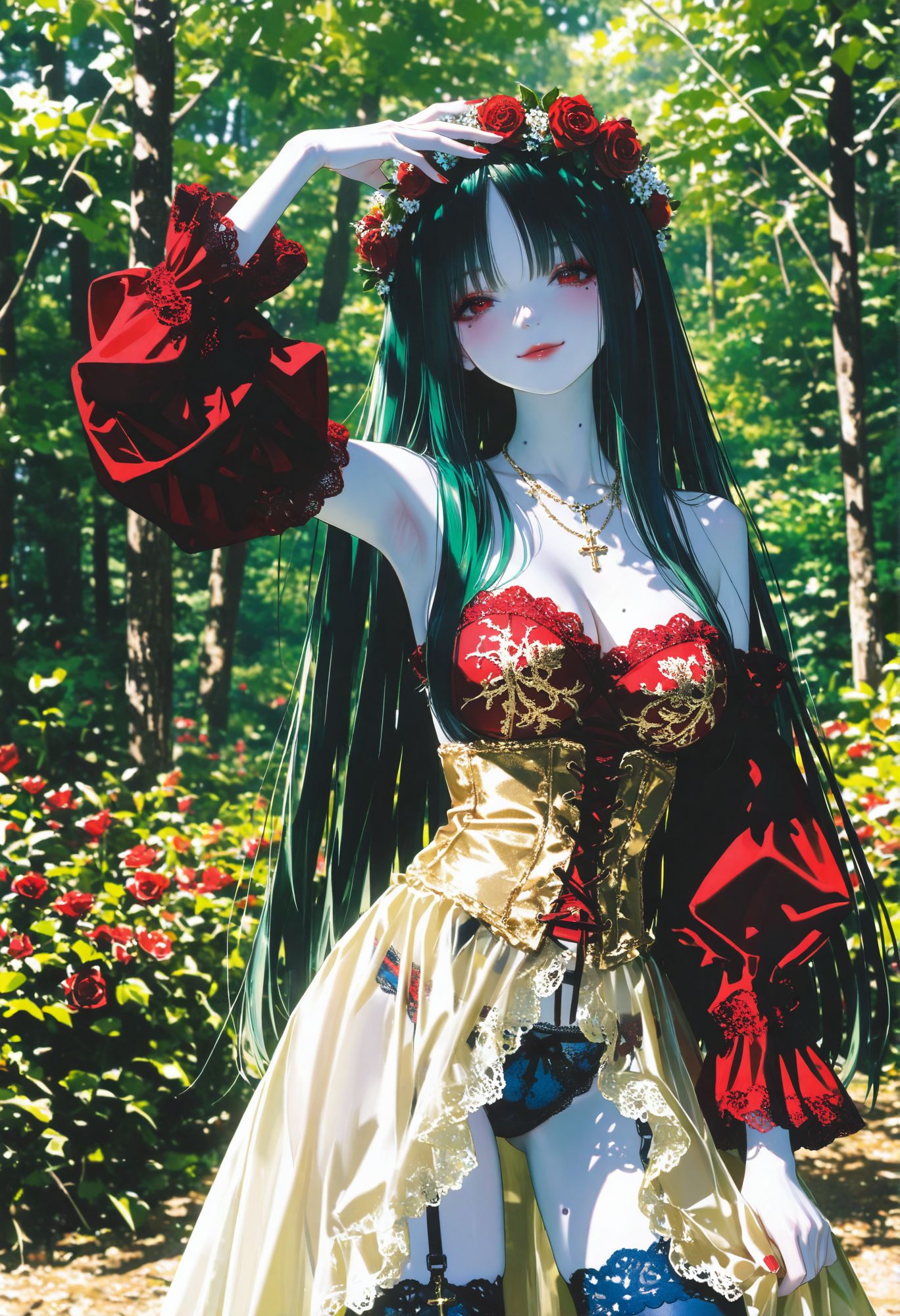
Spent today testing two new LoRAs I found — **0__11Xx** and **ma1ma1helmes_b**. Both Illustrious-style, both looked promising in the preview images. So I cleared a couple hours and ran them through the usual gauntlet.
First thing I tried was swapping out my People Works LoRA for these. People Works has been in my base stack for a while now — it does something specific to faces and skin rendering that I just like. Hard to describe exactly, but when it's in the mix the output feels more *finished*.
The new ones are different. **0__11Xx** at 0.4 weight gives this slightly more illustrated quality — still detailed, still realistic-leaning, but there's a softness to the rendering that works really well for forest scenes and natural lighting setups. **ma1ma1helmes_b** at 0.45 does something interesting with fabric and clothing detail. Lace, corsets, layered outfits — it picks up on those tags better than most LoRAs I've tested.
I ended up running a full batch with both of them active on a forest scene prompt — blonde girl in a green corset and white lace dress, flower wreath, dappled sunlight through the trees. Heavy on the clothing and environment tags, double-bracketed the important stuff. The results were genuinely good. The lace rendering in particular was a step up from what I usually get.
But here's the thing — when I compared the outputs side by side with the same prompt using my old People Works LoRA, I still preferred the People Works version for faces. The skin has more life to it. The new LoRAs win on clothing and environment detail, People Works wins on the human element. That's a useful thing to know.
Also hit a compatibility wall today that's worth documenting. One version of **People Works+** (the plus variant) is distributed only in **bf16** format. If you're running on a Mac with Apple Silicon using MPS — which I am — bf16 doesn't work. MPS doesn't support bfloat16 operations. The model just fails to load or throws tensor errors. You need to find the fp16 or fp32 version, or convert it yourself. Not a huge deal once you know, but if you're on a Mac and a LoRA mysteriously won't load, check the precision format first. That's probably your answer.
The takeaway from today: I'm adding 0__11Xx and ma1ma1helmes_b to my random LoRA pool for batch generation. They won't replace People Works in the base stack — that stays. But as random additions at 0.3-0.45 weight, they're going to add variety to outputs, especially on scenes with detailed outfits or natural environments. Sometimes the best discoveries don't replace what you have, they just expand what's possible.
— Admin · END TRANSMISSION —
SCROLL 004
·
2026.04.07 14:47
lora
discovery
testing
Reverse Engineering a LoRA From One Image

Saw an image today that stopped me mid-scroll. Something about it was just *better* — the skin had more depth, the shadows had more color, the lighting felt more intentional. Not a different style, just a higher quality version of what I'm already doing.
So I did what I always do when something catches my eye: I dug into the metadata.
The prompt was nothing special. The checkpoint was one I already use. The settings were close to mine. But there was one LoRA I didn't recognize — **Ri-mix [PONY + Illustrious]**.
Downloaded it and spent most of the day testing it. First by itself at different strengths to see what it actually does. Then paired with my usual LoRAs at different combinations and weights. Low strength, high strength, stacked with one LoRA, stacked with three.
What it does is subtle but it touches everything. Colors get a little more nuanced — not more saturated, just more *specific*. Skin picks up ambient light better. Shadows have more variation instead of just being dark. Lighting feels like it has more layers to it. It's the kind of thing where you put two images side by side and one just looks more "real" but you can't immediately point to why.
The strength matters a lot. Too high and it starts fighting with other LoRAs — especially style LoRAs that have their own opinion about lighting. Too low and you don't get much benefit. The sweet spot depends on what else is in the stack.
This one's going into the permanent rotation. Not on every image — it depends on the style and what other LoRAs are in play. But for the realistic-leaning stuff and the detailed illustration work, it's going to be in there. You'll probably start seeing the difference in my output over the next few days.
Sometimes the biggest upgrades don't come from new checkpoints or new prompts. They come from one LoRA that shifts everything 10% better.
— Admin · END TRANSMISSION —
SCROLL 003
·
2026.04.05 05:16
triage
selection
posting
No New Recipes, Just Picking Winners
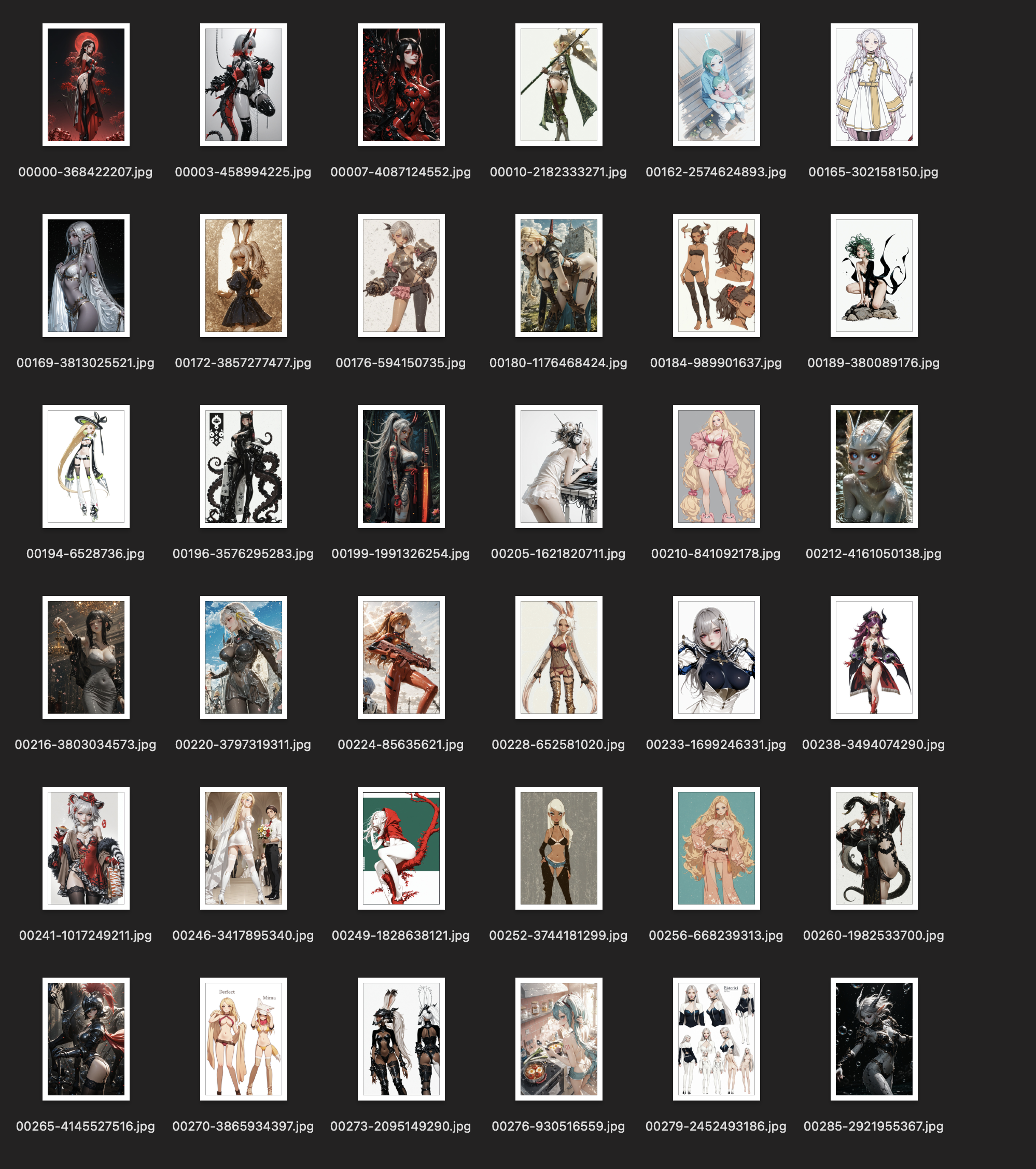
Some days I don't set up anything new. No new recipes, no new references, no enhancement passes. I just open what's already there and pick.
Today was one of those days. I had a backlog — a few hundred images from batches I ran over the last couple days that I hadn't fully gone through yet. So I loaded up the triage tool and started scrolling.
When you're picking from a big backlog, the temptation is to be generous. "Maybe this one has potential." "I could fix that in img2img." Don't. If it doesn't hit you in the first second, move on. The whole point of generating volume is that you don't have to settle.
Ended up pulling about 40 keepers out of maybe 350 images. Uploaded the best 30 to Civitai with full metadata. Saved 10 to the favorites folder for future remixing.
No new prompts written. No new tools used. Just eyes and judgment.
Days like this feel less productive, but they're actually when the library grows the most. Every image I post today becomes discoverable. Every favorite I save becomes tomorrow's starting material. The pipeline doesn't always need new input — sometimes it just needs you to finish processing what it already gave you.
— Admin · END TRANSMISSION —
SCROLL 002
·
2026.04.03 13:59
img2img
denoise
workflow
7 Models, 3 Denoise Levels, 1 Winner
Ran one of my batch recipe outputs through the img2img finish today. Picked a demon girl with horns from the batch — she had good composition and the expression was right, but the low-res quality wasn't there yet.
So I threw her through 7 different checkpoints at 3 denoise levels each. That's 21 versions of the same image. Low denoise keeps it close to the original — safe, clean, but not much improvement. High denoise lets the model reinterpret more — riskier, but sometimes it finds details you didn't know were there.
Out of 21 versions, 8 were clear improvements. The rest either lost the expression, muddied the horns, or went too far from the original concept. Narrowed those 8 down to 3 finalists by zooming in and comparing side by side.
The winner came from a mid-denoise pass. Enough freedom for the model to sharpen the jewelry and add depth to the skin texture, but not so much that it changed her face. That's the sweet spot — and it's different for every image.
The whole finish process took about 20 minutes. The batch that produced the original took 3 hours. 3 hours of generation, 20 minutes of polish. That's the ratio.
— Admin · END TRANSMISSION —
SCROLL 001
·
2026.04.01 18:47
checkpoint
workflow
selection
5 Checkpoints, 1 Reference, Pick the Winner
Same reference image. Same tags. Five different checkpoints. Keep the best one. That's today's workflow.
I have a folder of about 1,000 reference images I've saved over time — stuff I liked from anywhere. A script randomly pulls one out of the bag. I don't even choose. Whatever it grabs, that's today's starting point.
Each checkpoint interprets the same input differently. One gives me better skin texture. Another nails the lighting but fumbles the hands. A third one produces something I never would have imagined from that reference. The whole point is that I don't know which one will win until I see the results.
Today I ran about 100 images across 5 checkpoints. Kept roughly 1 out of every 5. Most of the rejects aren't bad — they're just not the best version of that concept. When you've seen the best one, the others feel flat.
One image caught me off guard today. Came out way better than I expected — the kind of result where the checkpoint found something in the reference that I didn't even see. That's the thing about this process. You're not fully in control. You set up the conditions and let the models surprise you.
That's 20 keepers out of 100. Tomorrow I'll do it again with a different random pull.
— Admin · END TRANSMISSION —